EmoteR 表情設定
Author: Kelvin Huang
https://crazyminnowstudio.com/docs/salsa-lip-sync/modules/emoter/using/
EmoteR (Emote Randomizer) 是 SALSA LipSync Suite 2.0 中包含的一個元件。EmoteR 允許配置「表情」,可隨機觸發、搭配 SALSA 強調觸發器使用,或製作循環重複動畫。此外,表情動作可透過程式手動觸發元件。
根據設計的需求,物件上可以有任意數量的 EmoteR 元件,而 SALSA 和 Eyes 在遊戲物件上只能有單一個元件實例。這樣的設計有很多的原因,為了組織。除了腳本階層中新增的 LateUpdate() 呼叫外,沒有真正的效能損失。這樣做有一些策略性的可能性,對設計者來說可能會很有趣,例如讓表情動作之間有有趣的過渡,根據角色模型的情緒來強調重點 = 例如 開心、生氣、悶悶不樂等。
選取場景中的角色,然後在 Inspector > SALSA > References 按下 Add Emoter (optional) 按鈕。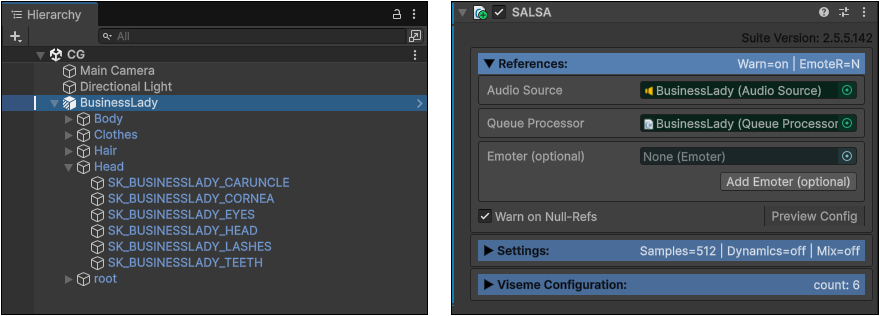
此角色將會增加一個 EmoteR 元件,先進行 References 設定,按下 Link Existing QueueProcessor 連結目前的序列處理器。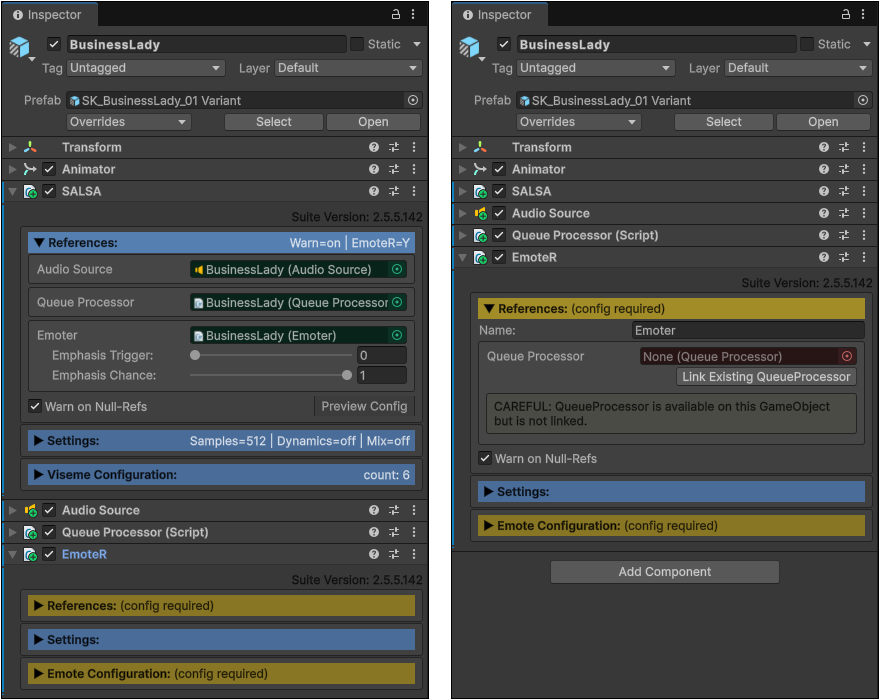
按下 New Emote 增加一個新的表情,用於呈現角色的喜怒樂… 等情緒。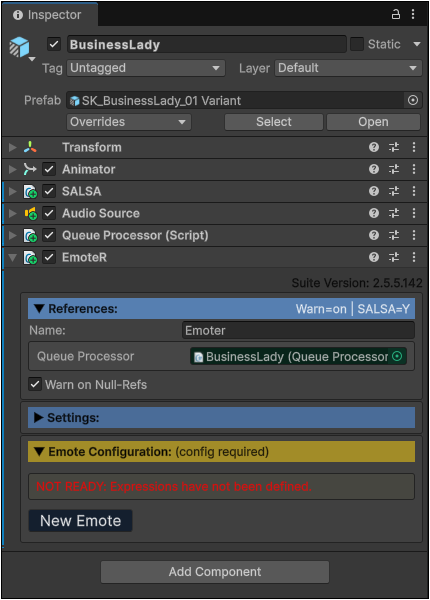
此表情可以透過多個 component 元件設定,首先將適當的 SkinnedMesh 拖曳到 Skinned Mesh Renderer 欄位。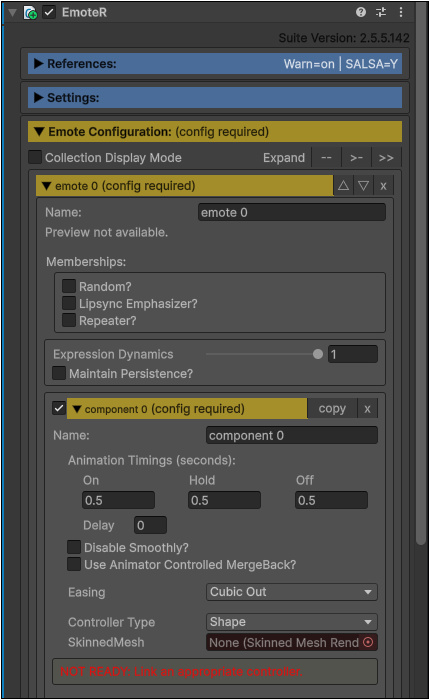
6578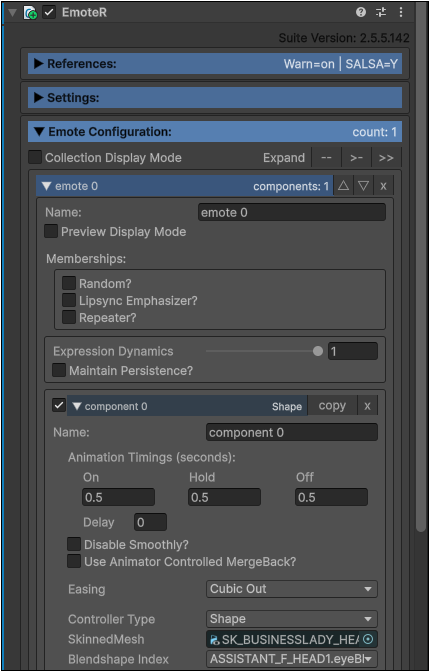
6579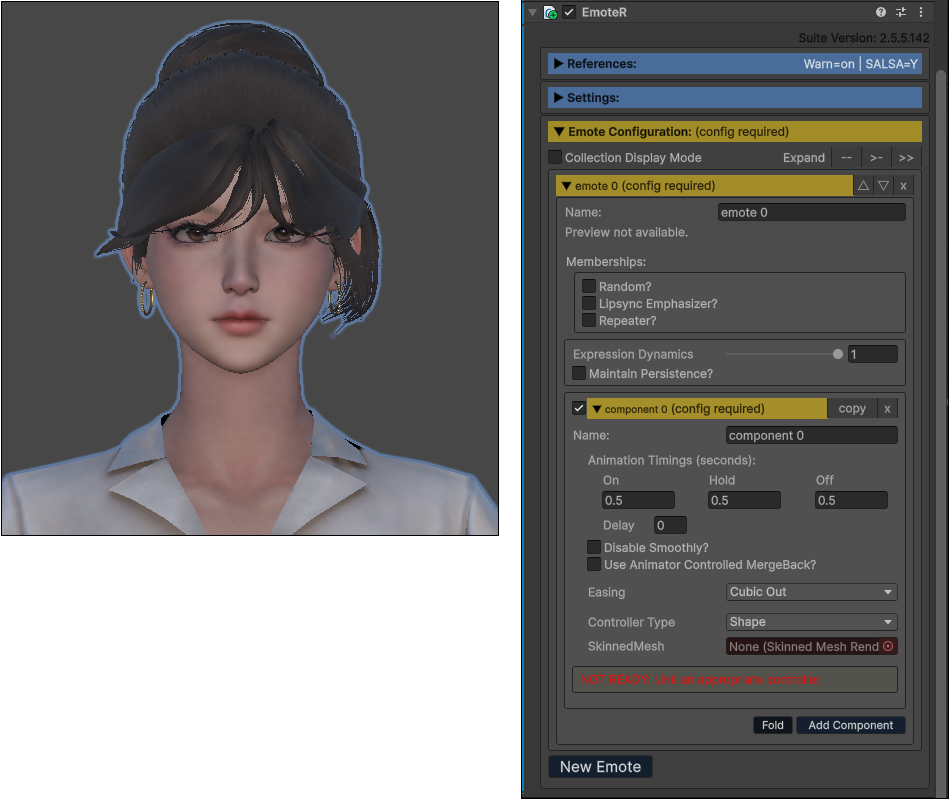
6580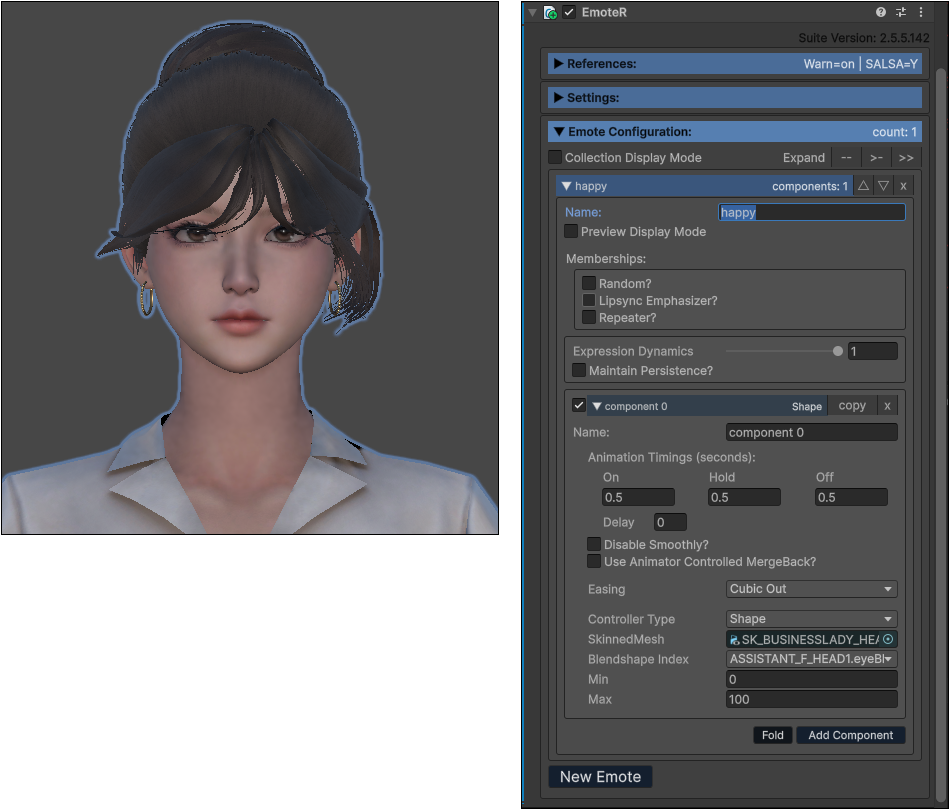
6581 透過 Blendershape 的 mouthSmile 設定,讓嘴角向上,呈現微笑開心的表情。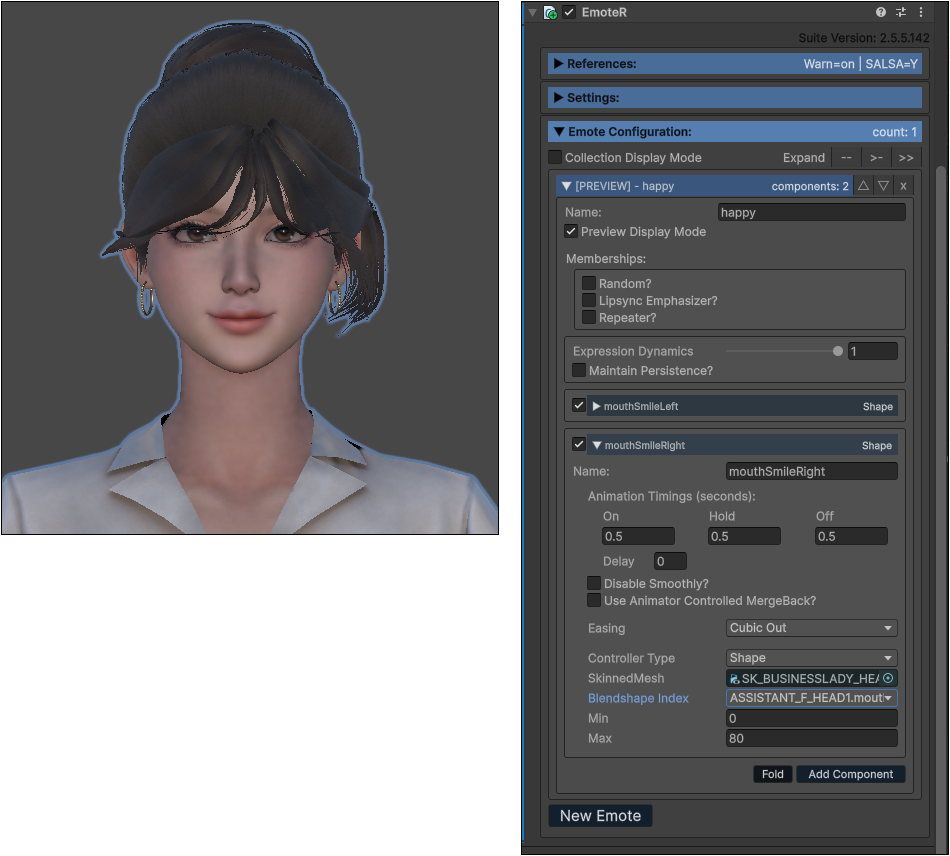
6583 表情設定完成之後,可以折疊。然後再按下 New Emote 建立下一個表情。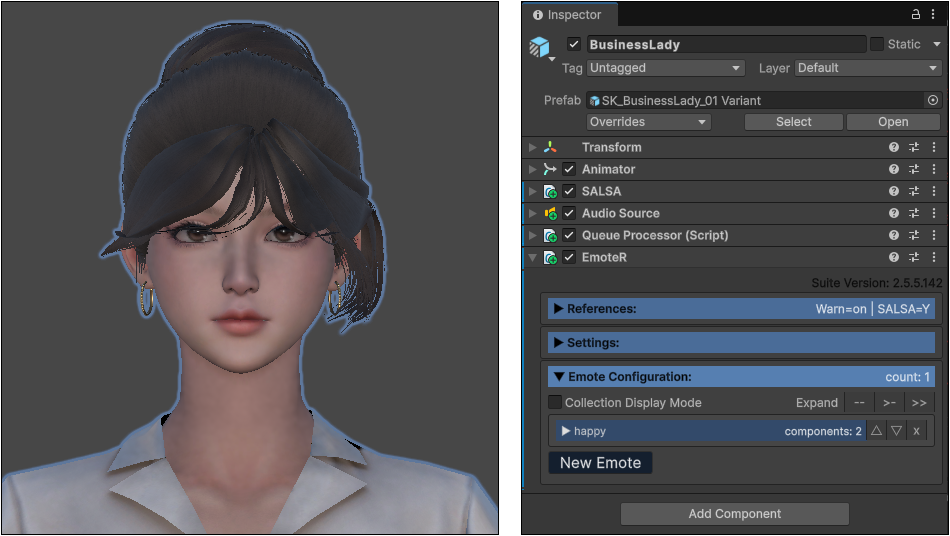
6584 angry 生氣的表情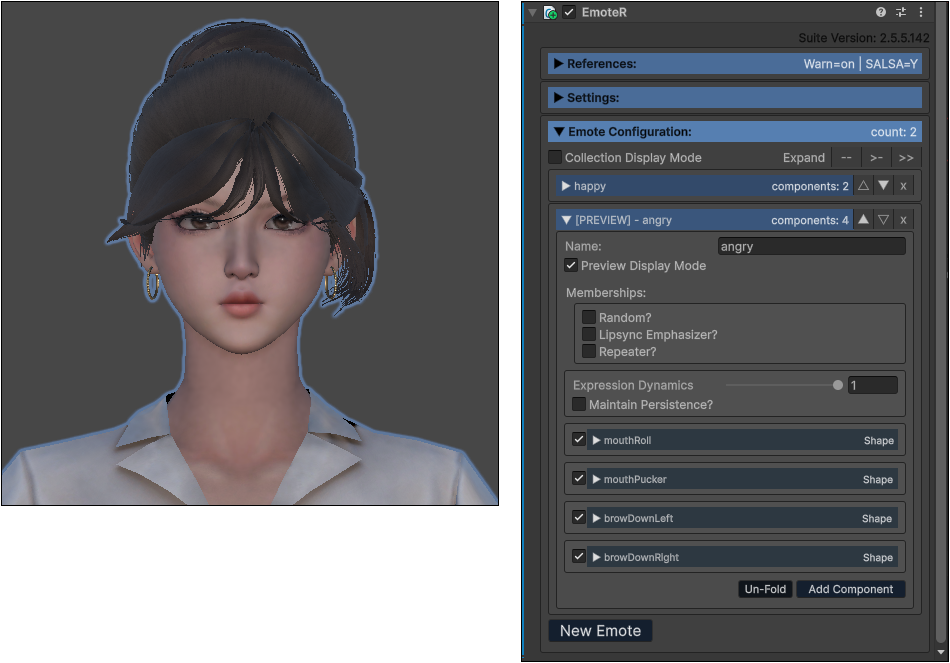
6585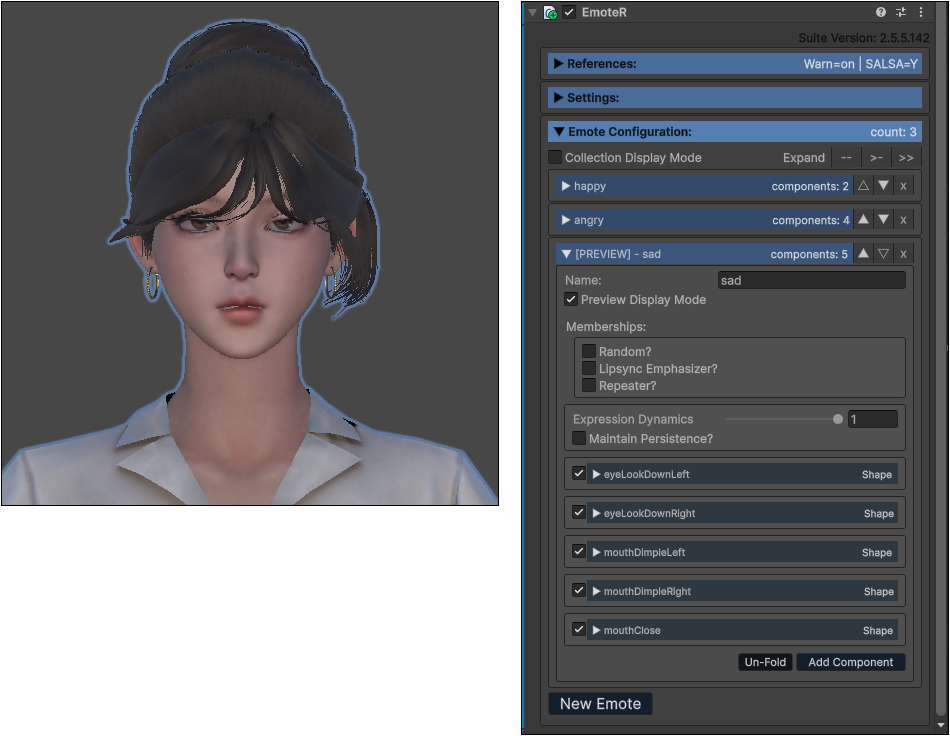
6586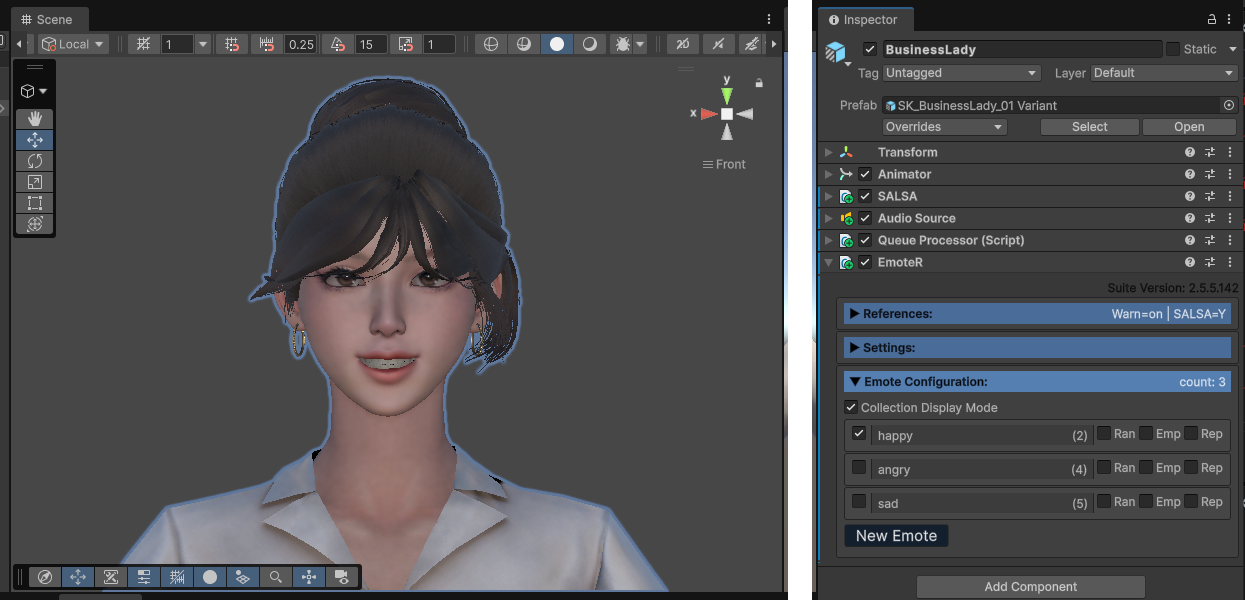
6587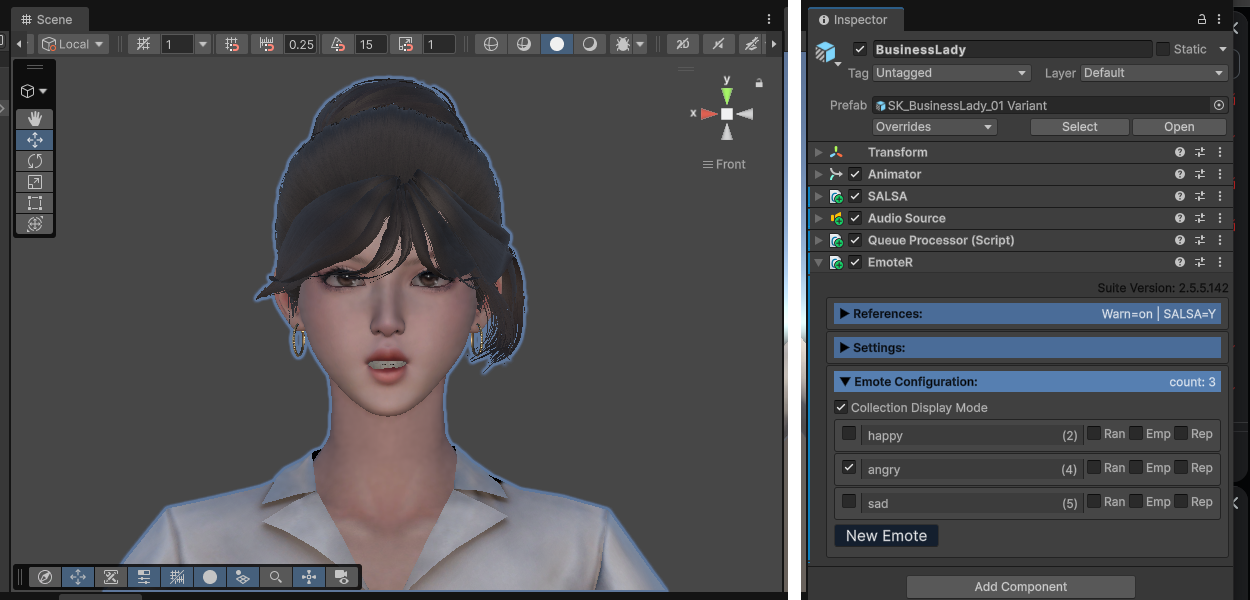
6588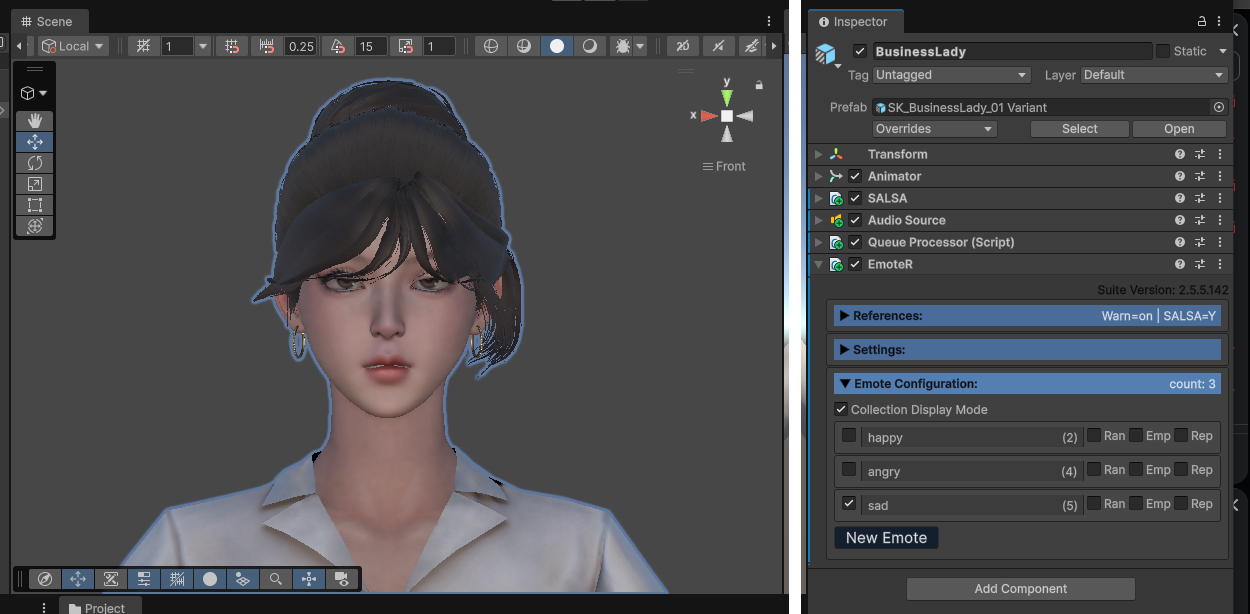
6589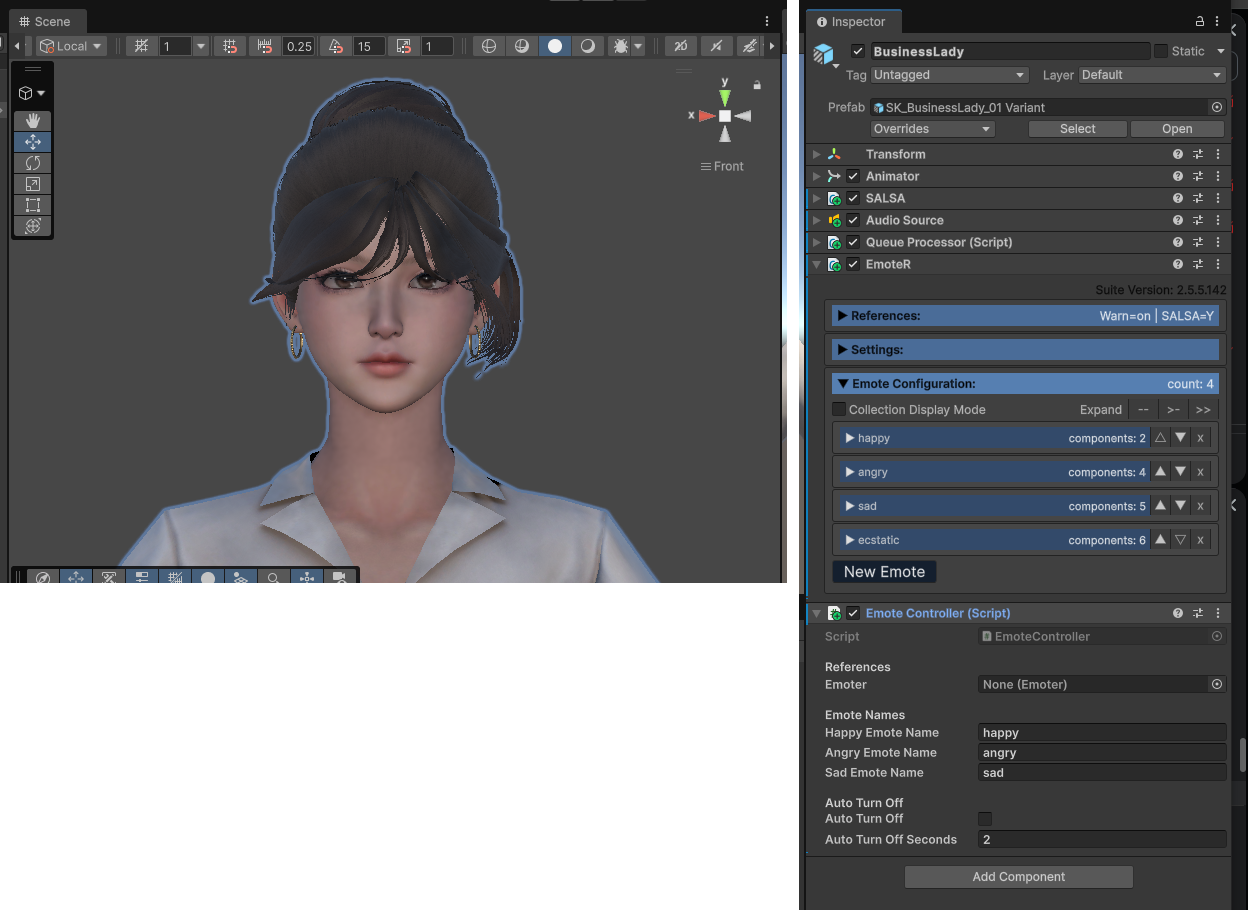
6590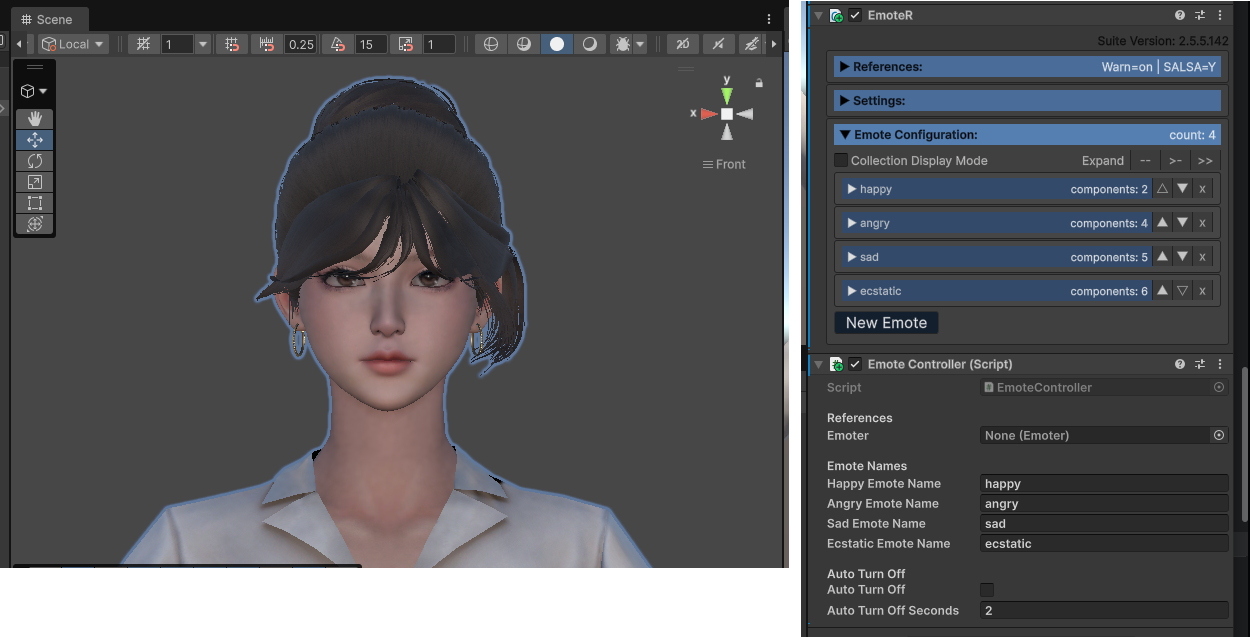
6591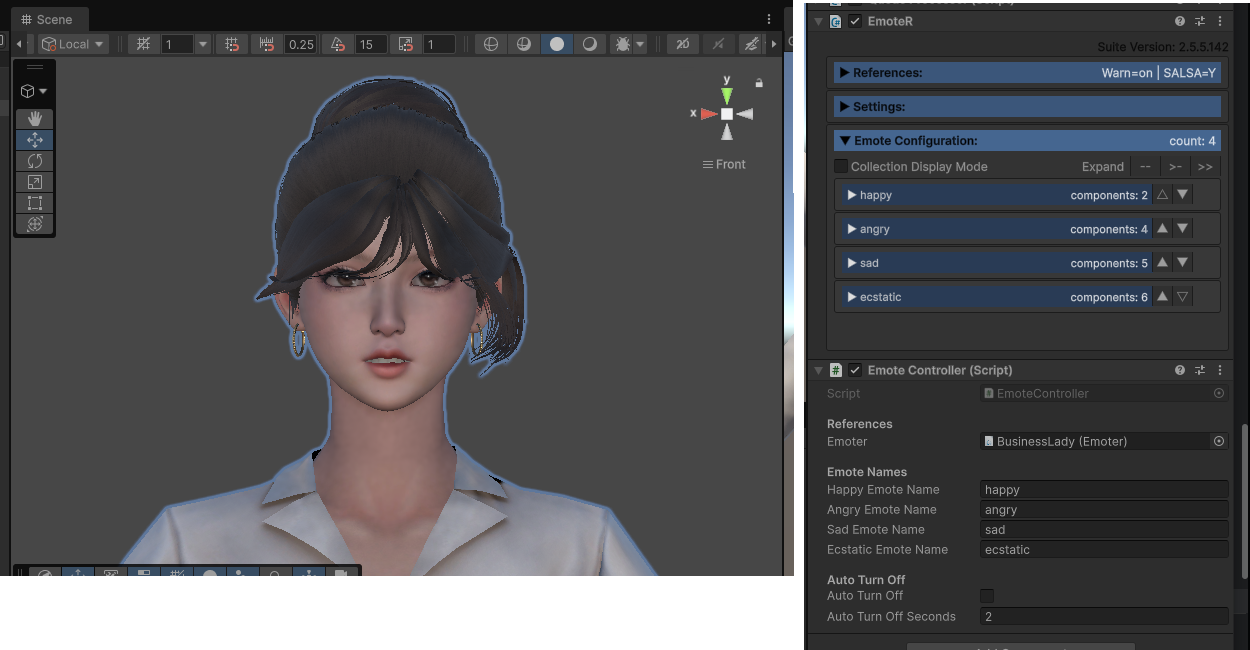
6592 開心的表情,透過 HEAD > jawOpen, TEETH > jawOpen, mouthSmileLeft, mouthSmileRight, eyeSquIntLeft... 設定。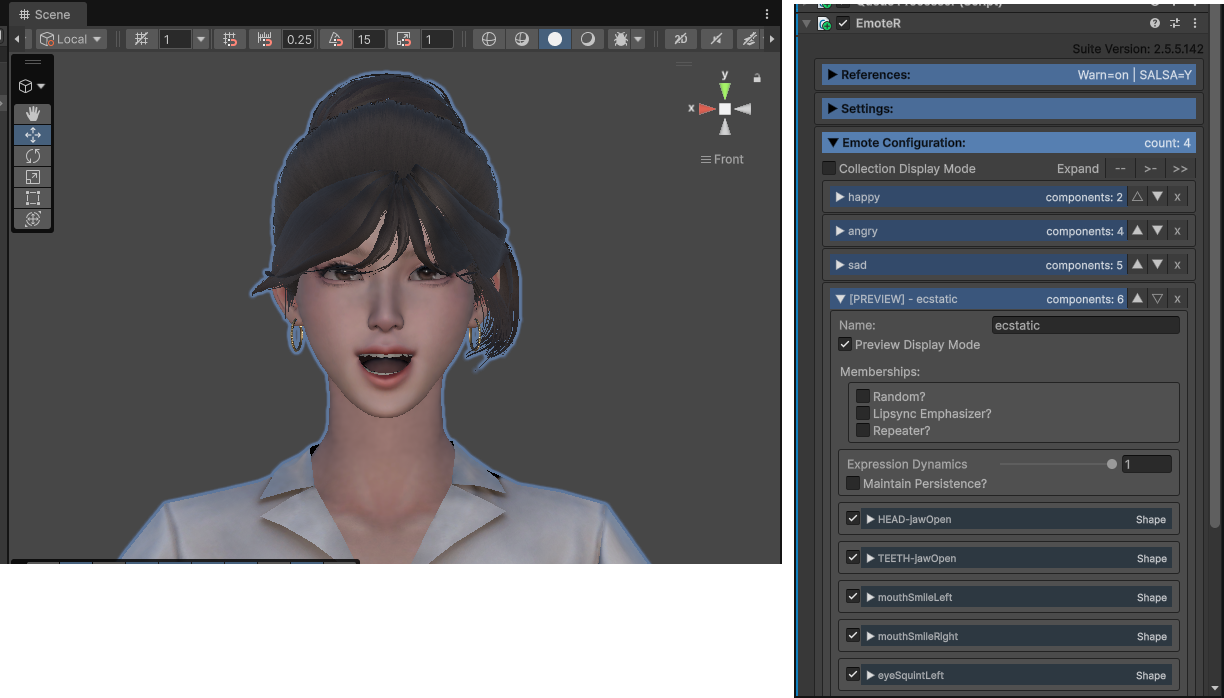
為此角色增加 EmoteKeyboardController.cs 腳本元件,若出現錯誤,可改為 Both 同時使用新舊版輸入系統。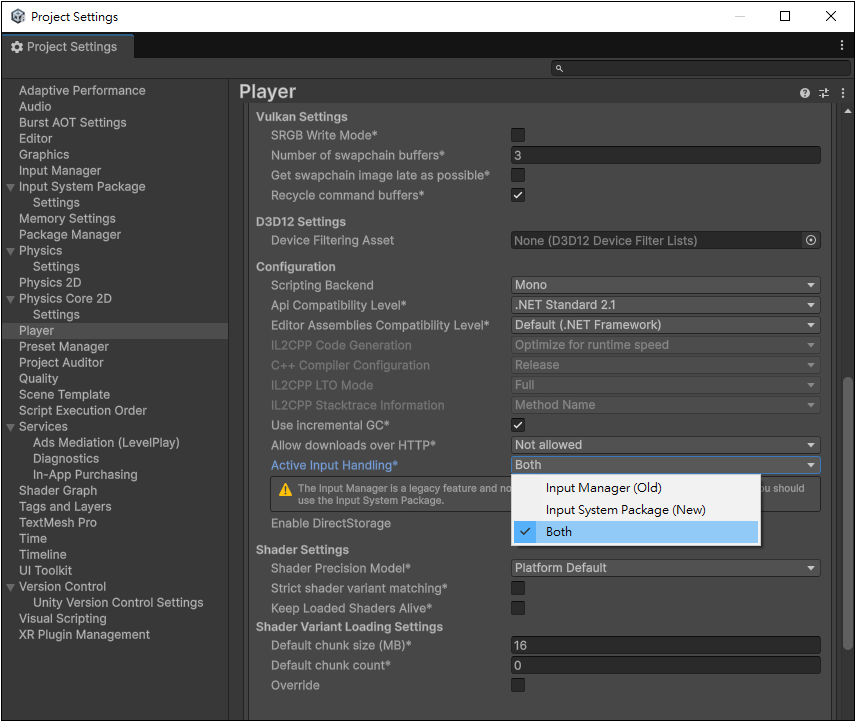
開啟 Emote Configuration 按下 New Emote 新增第一個臉部表情特徵
重複以上步驟,設定 angry, sad, happy 喜怒
|EmoteController.cs
EmoteR's Recommendations
There are no set blendshape requirements for EmoteR since it is an emote driver. It is purely based on your requirements. If you only need a happy-face emote that will randomly fire on your model, then that is your only requirement and you only need a single emote definition. If you would like to implement SALSA-triggered emphasis emotes you may want a wider variety of subtle shapes for a less twitchy look and feel. Our OneClick solutions only provide SALSA Emphasis Emote configurations. They are designed to be subtle and affect the portions of the face that normally animate while a person talks. Here are the representations we have implemented as closely as possible in our OneClicks:
Exasperation (cheek puff, slight brow raise -- make it subtle)
Soften (a smile and relaxed brows)
BrowsUp (both brows raised)
BrowUp (raise a single brow more than the other)
Squint (eye and brow narrowing)
Focus (eye narrowing)
Flare (nose/nostril movement)
Scrunch (nose/nostril movement, eye/brow narrowing)
Remember, Emphasis Emotes should be visible, but subtle. We recommend triggering emphasis emotes in the SALSA configuration at level 0.0f -- meaning they always trigger. And the EmoteR emphasis chance should be 100%. Audio analysis and timing will affect the amount or energy of the triggered emotes.
EmoteR (Emote Randomizer) 是 SALSA LipSync Suite 2.0 中包含的一個元件。EmoteR 允許配置「表情」,可隨機觸發、搭配 SALSA 強調觸發器使用,或製作循環重複動畫。此外,表情動作可透過程式手動觸發元件。
根據設計的需求,物件上可以有任意數量的 EmoteR 元件,而 SALSA 和 Eyes 在遊戲物件上只能有單一個元件實例。這樣的設計有很多的原因,為了組織。除了腳本階層中新增的 LateUpdate() 呼叫外,沒有真正的效能損失。這樣做有一些策略性的可能性,對設計者來說可能會很有趣,例如讓表情動作之間有有趣的過渡,根據角色模型的情緒來強調重點 = 例如 開心、生氣、悶悶不樂等。
選取場景中的角色,然後在 Inspector > SALSA > References 按下 Add Emoter (optional) 按鈕。
此角色將會增加一個 EmoteR 元件,先進行 References 設定,按下 Link Existing QueueProcessor 連結目前的序列處理器。
按下 New Emote 增加一個新的表情,用於呈現角色的喜怒樂… 等情緒。
此表情可以透過多個 component 元件設定,首先將適當的 SkinnedMesh 拖曳到 Skinned Mesh Renderer 欄位。
6578
6579
6580
6581 透過 Blendershape 的 mouthSmile 設定,讓嘴角向上,呈現微笑開心的表情。
6583 表情設定完成之後,可以折疊。然後再按下 New Emote 建立下一個表情。
6584 angry 生氣的表情
6585
6586
6587
6588
6589
6590
6591
6592 開心的表情,透過 HEAD > jawOpen, TEETH > jawOpen, mouthSmileLeft, mouthSmileRight, eyeSquIntLeft... 設定。
為此角色增加 EmoteKeyboardController.cs 腳本元件,若出現錯誤,可改為 Both 同時使用新舊版輸入系統。
開啟 Emote Configuration 按下 New Emote 新增第一個臉部表情特徵
重複以上步驟,設定 angry, sad, happy 喜怒
|EmoteController.cs
EmoteR's Recommendations
There are no set blendshape requirements for EmoteR since it is an emote driver. It is purely based on your requirements. If you only need a happy-face emote that will randomly fire on your model, then that is your only requirement and you only need a single emote definition. If you would like to implement SALSA-triggered emphasis emotes you may want a wider variety of subtle shapes for a less twitchy look and feel. Our OneClick solutions only provide SALSA Emphasis Emote configurations. They are designed to be subtle and affect the portions of the face that normally animate while a person talks. Here are the representations we have implemented as closely as possible in our OneClicks:
Exasperation (cheek puff, slight brow raise -- make it subtle)
Soften (a smile and relaxed brows)
BrowsUp (both brows raised)
BrowUp (raise a single brow more than the other)
Squint (eye and brow narrowing)
Focus (eye narrowing)
Flare (nose/nostril movement)
Scrunch (nose/nostril movement, eye/brow narrowing)
Remember, Emphasis Emotes should be visible, but subtle. We recommend triggering emphasis emotes in the SALSA configuration at level 0.0f -- meaning they always trigger. And the EmoteR emphasis chance should be 100%. Audio analysis and timing will affect the amount or energy of the triggered emotes.
Copyright © 2026 CG Digital Corp. All rights reserved.